Functions
Functions are the heart of any programming language. Without them, we’d have to copy-paste code every time we wanted to reuse it. With functions, we can:
- Name a piece of computation (so we can refer to it later)
- Parameterize it with inputs (so it can work with different values)
- Reuse it multiple times (write once, call anywhere)
Functions are also the key to abstraction - hiding complexity behind a simple name. When you call fibonacci(10), you don’t need to think about how Fibonacci is computed. The function encapsulates that knowledge.
Defining Functions
In Firstlang, we define functions with def:
def add(a, b) {
    return a + b
}
Let’s break this down:
def- Keyword that starts a function definitionadd- The function’s name (how we’ll call it later)(a, b)- Parameters: names for the inputs this function expects{ ... }- The body: code that runs when the function is calledreturn a + b- What the function gives back to its caller
When we call add(3, 4), the parameters a and b get bound to the values 3 and 4, the body executes, and the result 7 is returned.
The AST
In our AST, functions are statements (they’re declarations, not expressions):
enum Stmt {
    Function {
        name: String,
        params: Vec<String>,
        body: Vec<Stmt>,
    },
    // ...
}
Let’s understand each field:
name: String- The function’s name, like"add"or"fibonacci"params: Vec<String>- List of parameter names:["a", "b"]foradd(a, b)body: Vec<Stmt>- The statements inside the function body
When we parse def add(a, b) { return a + b }, we create:
Stmt::Function {
    name: "add".to_string(),
    params: vec!["a".to_string(), "b".to_string()],
    body: vec![
        Stmt::Return(Expr::Binary {
            op: BinaryOp::Add,
            lhs: Box::new(Expr::Var("a".to_string())),
            rhs: Box::new(Expr::Var("b".to_string())),
        })
    ],
}
How Function Calls Work
When we evaluate a function call like add(3, 4), several things happen in sequence. Understanding this sequence is key to understanding how programming languages work.
Here’s the process:
- Look up the function by name - Find the
Functionvalue we stored when we definedadd - Evaluate the arguments - Compute
3and4(trivial here, but could be complex expressions) - Create a new frame - Make a fresh environment for this call’s local variables
- Bind parameters - Associate parameter names with argument values (
a = 3, b = 4) - Execute the function body - Run the statements in the function
- Return the result - Pop the frame and give the result back to the caller
Here’s how this looks in code:
Expr::Call { name, args } => {
    // Step 1: Look up the function by name
    let func = self.lookup_var(name)?;

    if let Value::Function { params, body } = func {
        // Step 2: Evaluate all arguments
        // If we have add(1 + 2, 3 * 4), we compute 3 and 12 first
        let arg_values: Vec<Value> = args.iter()
            .map(|a| self.eval_expr(a))
            .collect::<Result<_, _>>()?;

        // Step 3 & 4: Create new frame with parameter bindings
        // This is like creating a fresh "scratch pad" for this call
        let mut frame = Frame::new();
        for (param, arg) in params.iter().zip(arg_values) {
            frame.locals.insert(param.clone(), arg);
        }

        // Step 5: Push frame, execute body
        self.call_stack.push(frame);
        let result = self.execute_body(&body)?;

        // Step 6: Pop frame, return result
        self.call_stack.pop();
        Ok(result)
    } else {
        Err(format!("{} is not a function", name))
    }
}
The key insight here is that each function call gets its own environment. When we call add(3, 4), we create a = 3, b = 4 in a fresh frame. This frame is destroyed when the function returns. That’s why local variables are local - they only exist in their frame.
The Call Stack
The call stack is like a stack of sticky notes. Each function call writes its variables on a new note and puts it on top. When the function returns, you tear off the top note and throw it away. The note underneath becomes current again. This is why
inner()’s variables don’t overwriteouter()’s - they’re on different notes.
The call stack is what makes function calls work. Each “frame” on the stack represents one function call in progress. Here’s a visual example:
def outer() {
    x = 1
    return inner()
}

def inner() {
    y = 2
    return y
}

outer()
When we call outer():
- Create a frame for
outer, setx = 1 - Call
inner()- create a new frame on top - In
inner, sety = 2 innerreturns 2, pop its frame- Back in
outer, receive2as the result outerreturns 2, pop its frame
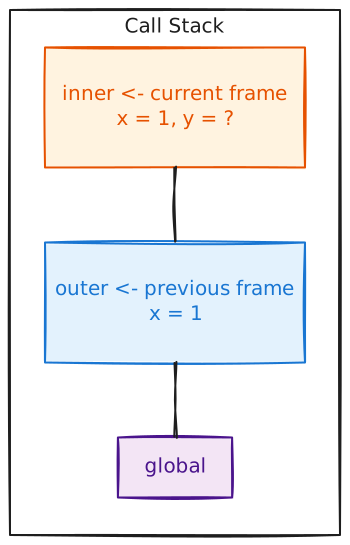
The stack grows when functions are called and shrinks when they return. This is why we call it a stack - last in, first out.
One Frame Per Call
Consider this code:
def foo(x) {
    return x + 1
}

foo(5)    # x = 5 here
foo(10)   # x = 10 here
Each call to foo has its own x. The first call’s x = 5 doesn’t interfere with the second call’s x = 10 because they’re in different frames.
This becomes especially important for recursion, which we’ll see in the recursion chapter. In recursive calls, the same function is on the stack multiple times, each with its own set of variables.
Examples
Simple Function
def square(x) {
    return x * x
}

square(5)       # 25
This defines square that takes one number and returns its square. When we call square(5), a frame is created with x = 5, the body computes 5 * 5 = 25, and that’s returned.
Multiple Parameters
def area(width, height) {
    return width * height
}

area(4, 5)      # 20
Parameters are bound in order: width = 4, height = 5. The body computes 4 * 5 = 20.
Functions Calling Functions
def double(x) {
    return x * 2
}

def quadruple(x) {
    return double(double(x))
}

quadruple(5)    # 20
This shows function composition. quadruple(5) calls double(5) which returns 10, then calls double(10) which returns 20.
The call stack during quadruple(5):
- Frame for
quadruple:x = 5 - Call
double(5): new frame withx = 5 doublereturns10, pop its frame- Call
double(10): new frame withx = 10 doublereturns20, pop its framequadruplereturns20, pop its frame
Notice how x has different values in different frames, even though they’re all named x.
Next, we’ll add control flow: the ability to make decisions and repeat actions.